Table
中文名称
表格控件
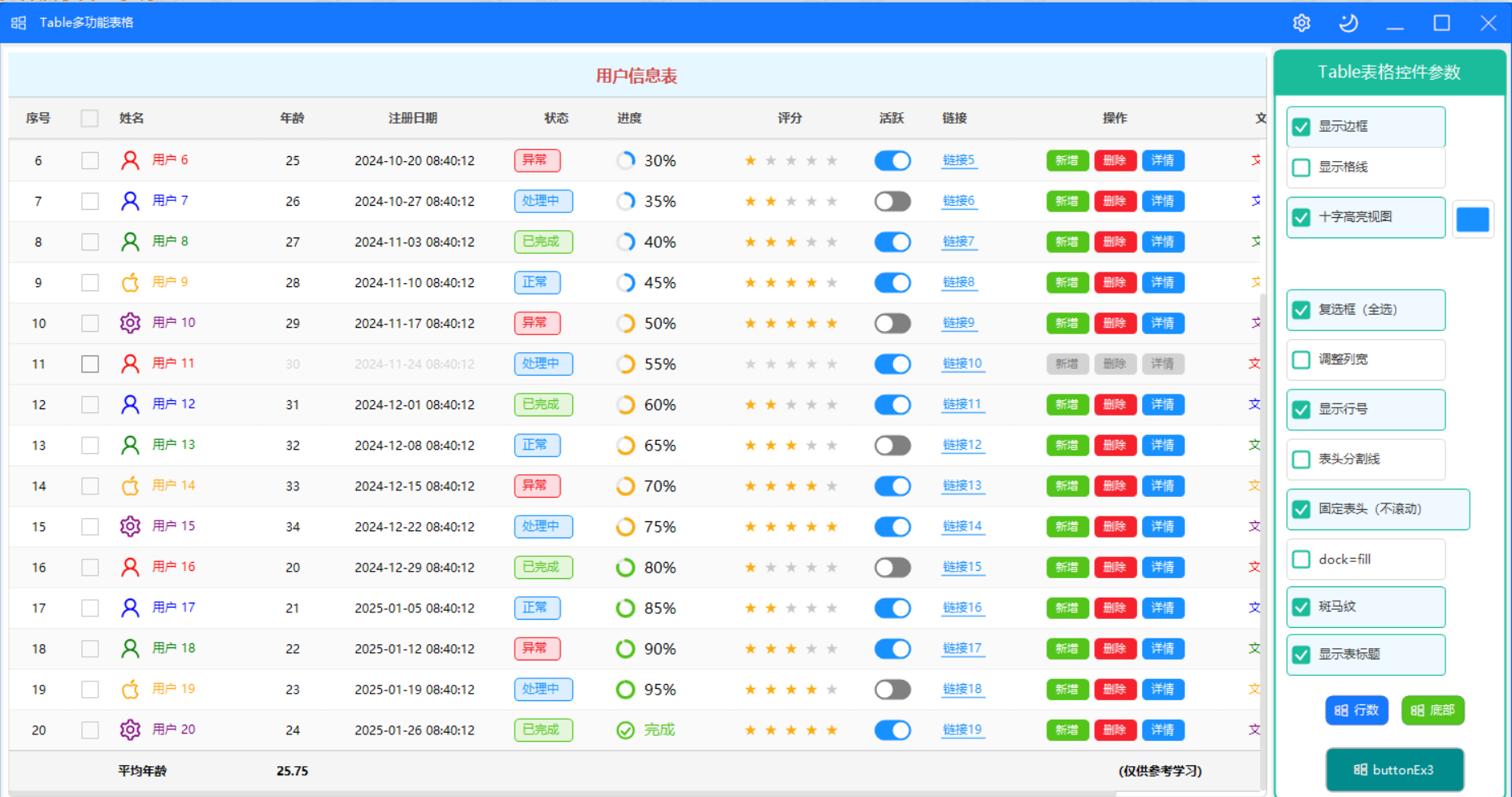
控件优点
Table 是一个功能丰富的现代化表格控件,参考 Ant Design Table 组件设计,具有以下优点:
- 丰富的单元格类型:支持文本、数字、布尔值(开关)、图片、标签、进度条、链接、图标、日期、日期时间、按钮组、评分、自定义等多种类型
- 表头功能:支持显示/隐藏表头、固定表头、表头分割线
- 选择功能:支持复选框选择、全选/反选
- 行号显示:自动显示行号,支持自定义宽度
- 排序功能:支持点击表头排序
- 列宽调整:支持拖动调整列宽
- 斑马纹:支持奇偶行不同背景色
- 悬停高亮:鼠标悬停时行高亮
- 主题支持:实现 IThemeable 接口,支持亮暗主题切换
- 滚动支持:支持水平和垂直滚动,滚动条仅在悬停时显示
- 属性变更通知:实现 INotifyPropertyChanged 接口,属性修改即时生效
重要参数说明
Table 控件属性
| 属性 | 类型 | 默认值 | 说明 |
|---|---|---|---|
Columns |
List<TableColumn> | 空列表 | 列定义集合 |
Rows |
List<TableRow> | 空列表 | 行数据集合 |
Bordered |
bool | true | 是否显示边框 |
ShowHeader |
bool | true | 是否显示表头 |
FixedHeader |
bool | false | 是否固定表头 |
ShowRowNumber |
bool | false | 是否显示行号列 |
ShowCheckbox |
bool | false | 是否显示复选框列 |
CopyData |
CopyDataMode | None | 点击复制模式(None/Cell/Row/Column/CellAndRow/All) |
Striped |
bool | false | 是否显示斑马纹 |
RowCount |
int | - | 只读,行总数 |
Hoverable |
bool | true | 是否启用悬停高亮 |
Loading |
bool | false | 是否显示加载状态 |
BorderRadius |
int | 6 | 圆角大小 |
CellPadding |
int | 8 | 单元格内边距 |
HeaderHeight |
int | 40 | 表头高度 |
RowHeight |
int | 40 | 行高度 |
BorderColor |
Color | #C8C8C8 | 边框颜色 |
ScrollBarColor |
Color | #E0E0E0 | 滚动条颜色 |
HeaderBackColor |
Color | #F5F5F5 | 表头背景色 |
HeaderForeColor |
Color | #404040 | 表头文字颜色 |
RowBackColor |
Color | White | 行背景色 |
RowForeColor |
Color | Black | 行文字颜色 |
HoverBackColor |
Color | #E6F7FF | 悬停背景色 |
SelectedBackColor |
Color | #BAE7FF | 选中背景色 |
SelectedForeColor |
Color | #1890FF | 选中文字颜色 |
FollowGlobalTheme |
bool | true | 是否跟随全局主题 |
ShowTitle |
bool | false | 是否显示表标题 |
Title |
string | "" | 表标题文本 |
TitleHeight |
int | 36 | 表标题高度 |
TitleFont |
Font | null | 表标题字体 |
TitleForeColor |
Color | Empty | 表标题文字颜色 |
TitleBackColor |
Color | Empty | 表标题背景色 |
TitleAlign |
ColumnAlign | Center | 表标题对齐方式(Left/Center/Right) |
ShowSummary |
bool | false | 是否显示汇总行 |
SummaryRow |
TableSummaryRow | null | 汇总行配置 |